v1.4 — Available in 11 languages

Real-time altitude tracking
on your car's screen

Track elevation, get voice alerts for snow line and weather hazards, export trips as GPX, and analyze energy consumption — natively on your Android Automotive head unit. No phone needed.

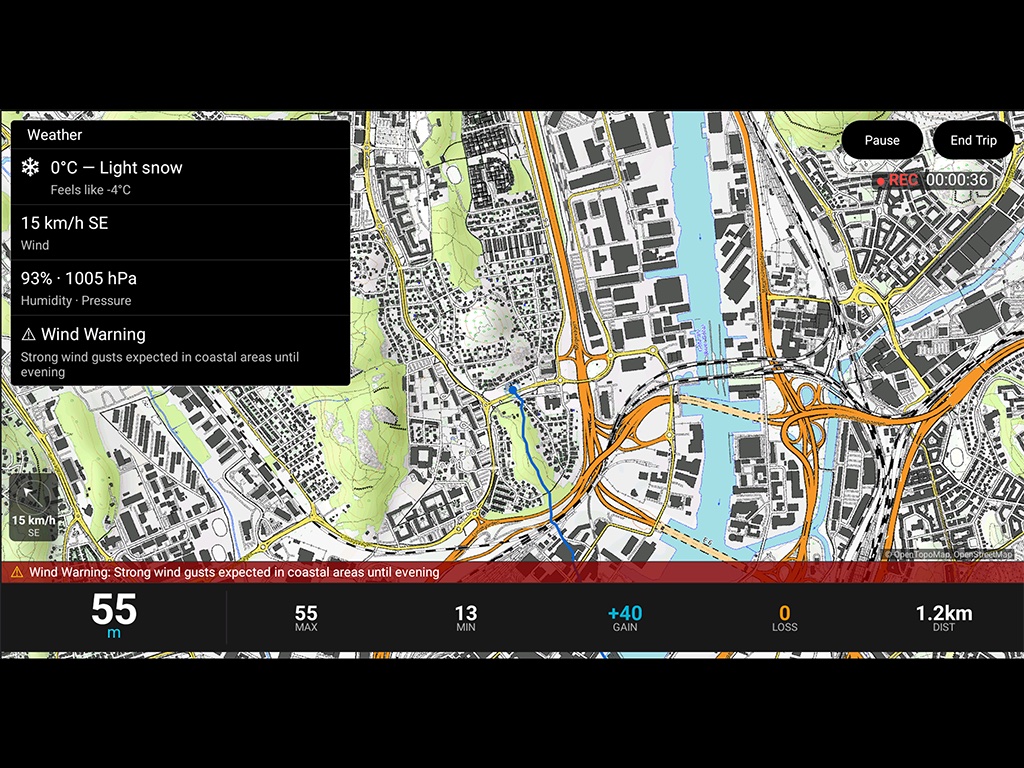
AltitudeTracker running on an Android Automotive car head unit showing a topographic map, weather data with wind warning, and real-time altitude at 55 meters
Get it on Google Play
60+
Compatible vehicles
12
Car brands
11
Languages

Everything you need for
mountain and altitude driving

Built specifically for Android Automotive. Designed for the big screen.

Real-time altitude

Live elevation data with GPS accuracy, NMEA MSL support, and EGM96 geoid correction for precise readings.

Elevation profile

See your climb and descent history as an interactive graph. Track cumulative ascent, descent, and grade percentage.

🔊

Voice alerts

Official weather alerts read aloud while you drive. Snow line and freezing level warnings when you're within 100 m. Sunrise and sunset alerts about one hour ahead.

Weather and snow line

Temperature, wind arrow relative to your heading, precipitation, AQI, atmospheric pressure — plus real-time snow line and 0°C isotherm altitude.

Energy consumption

Monitor how altitude changes affect your EV's energy use. See real-time kW draw and consumption per 100 km on climbs and descents.

Compass and inclinometerExpanded

GPS compass with bearing display — tap to expand it to double size with detailed tick marks every 5° and labels every 30°. Live slope reading in percentage and degrees while driving.

📊

Trip summaryNew

End your trip and get a full stats overview: duration, distance, max/min altitude, total ascent and descent, average consumption, and weather conditions.

🗺

GPX exportNew

Export your GPS track as GPX 1.1 with Garmin TrackPointExtension — speed, temperature, bearing, and slope grade. Compatible with Google Earth, Strava, Komoot, and GPXSee.

Metric and imperial

Auto-detects your region's units or toggle manually. Meters or feet, km/h or mph, Celsius or Fahrenheit — your choice.

🌑

Night modeImproved

Your route stays bright and visible over the darkened map at night. The polyline draws on top of the night overlay so you never lose your track.

CSV data export

Export trip data for analysis in polestats.com or any spreadsheet. Your data, your control.

Privacy-first

No accounts. No cloud. No tracking. All data stays on your vehicle. Works offline for core altitude features.

Works with 60+ vehicles
from 12 brands

Any car with Android Automotive OS and Google Play Store can run AltitudeTracker. See all vehicles →

New vehicles are added automatically as manufacturers release them with Google Play Store support. Don't see your car? If it has the Google Play Store on the dashboard, AltitudeTracker will work.

Your data stays in your car

AltitudeTracker is built with a privacy-first philosophy.

🔒

No accounts

Install and use immediately. No sign-up, no login, no email required.

📡

Local storage only

All trip data is stored on your vehicle. Nothing is uploaded to any server.

📦

CSV & GPX export

Export your data anytime as CSV or GPX. Analyze trips on polestats.com, open tracks in Google Earth or Strava.

Frequently asked questions

Which cars are compatible with AltitudeTracker?
AltitudeTracker works with any vehicle running Android Automotive OS (AAOS) with Google Play Store. This includes Polestar 2, 3, 4, Volvo EX30, EX40, EX90, ES90, C40, XC40, XC60, XC90, Renault Megane E-Tech, Scenic, Austral, Espace, Alpine A290, A390, Nissan Ariya, Leaf, Rogue, Qashqai, Chevrolet Blazer EV, Equinox EV, Silverado, Cadillac Lyriq, Honda Prologue, Accord, CR-V, Mazda CX-5, CX-90, BYD Atto 3, Sealion 8, and many more. If your car has Google Play Store on the dashboard, AltitudeTracker will work.
Does AltitudeTracker need an internet connection?
The core altitude tracking works offline using your vehicle's GPS sensor. Weather data and some enrichment features require an internet connection through your car's built-in data plan or a Wi-Fi hotspot.
Does AltitudeTracker track my location or share data?
No. AltitudeTracker is privacy-first by design. All trip data is stored locally on your vehicle. There are no accounts, no cloud storage, and no tracking. You can export your data as CSV or GPX files at any time.
Does it work on non-EV vehicles?
Yes. While the energy consumption features are designed for electric vehicles, the altitude tracking, elevation profiles, and weather data work on any vehicle with Android Automotive OS. This includes ICE vehicles from Chevrolet, GMC, Mazda, Honda, and others that use Google built-in infotainment.
Which languages are supported?
AltitudeTracker is available in 11 languages: English, Spanish, French, German, Italian, Dutch, Portuguese, Swedish, Norwegian, Danish, and Finnish.
Can I export my trips as GPX files?
Yes. AltitudeTracker exports trips in both CSV and GPX 1.1 format. GPX files include latitude, longitude, elevation, and timestamps, plus speed, temperature, bearing, and slope grade via Garmin TrackPointExtension. Open your tracks in Google Earth, Strava, Komoot, GPXSee, or any GPX-compatible application.
How can I analyze my trip data?
Export your trips as CSV and upload them to polestats.com for free trip analysis with charts, maps, and statistics. Polestats runs entirely in your browser — your data is never uploaded to any server.
Ready to track your altitude?

One-time purchase. No subscription. No ads.

Get it on Google Play